> ## Documentation Index
> Fetch the complete documentation index at: https://developers.ebioro.com/llms.txt
> Use this file to discover all available pages before exploring further.
# Payments
> How payment processing works on Ebioro
## Payment Lifecycle
Every payment goes through a series of statuses:
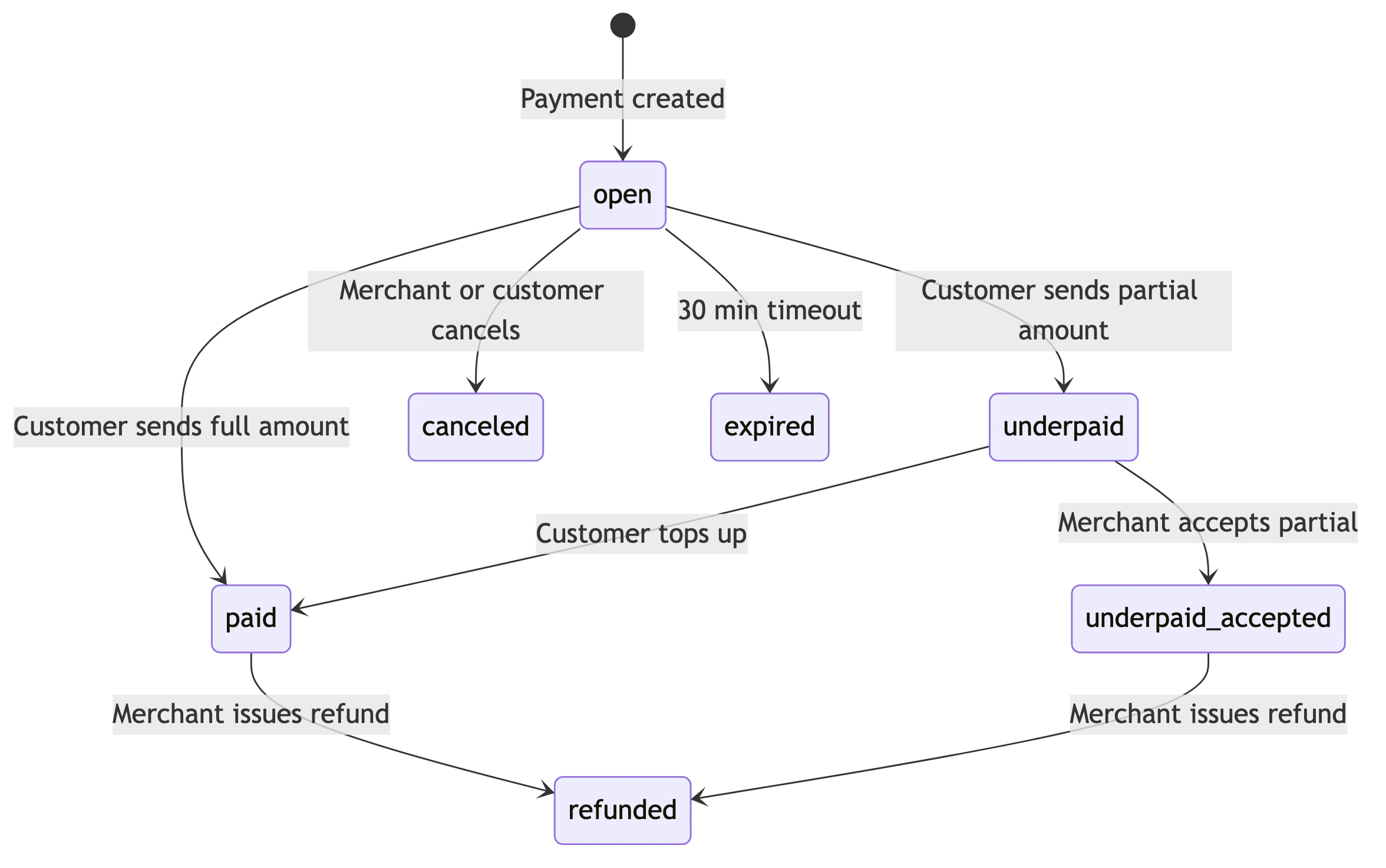
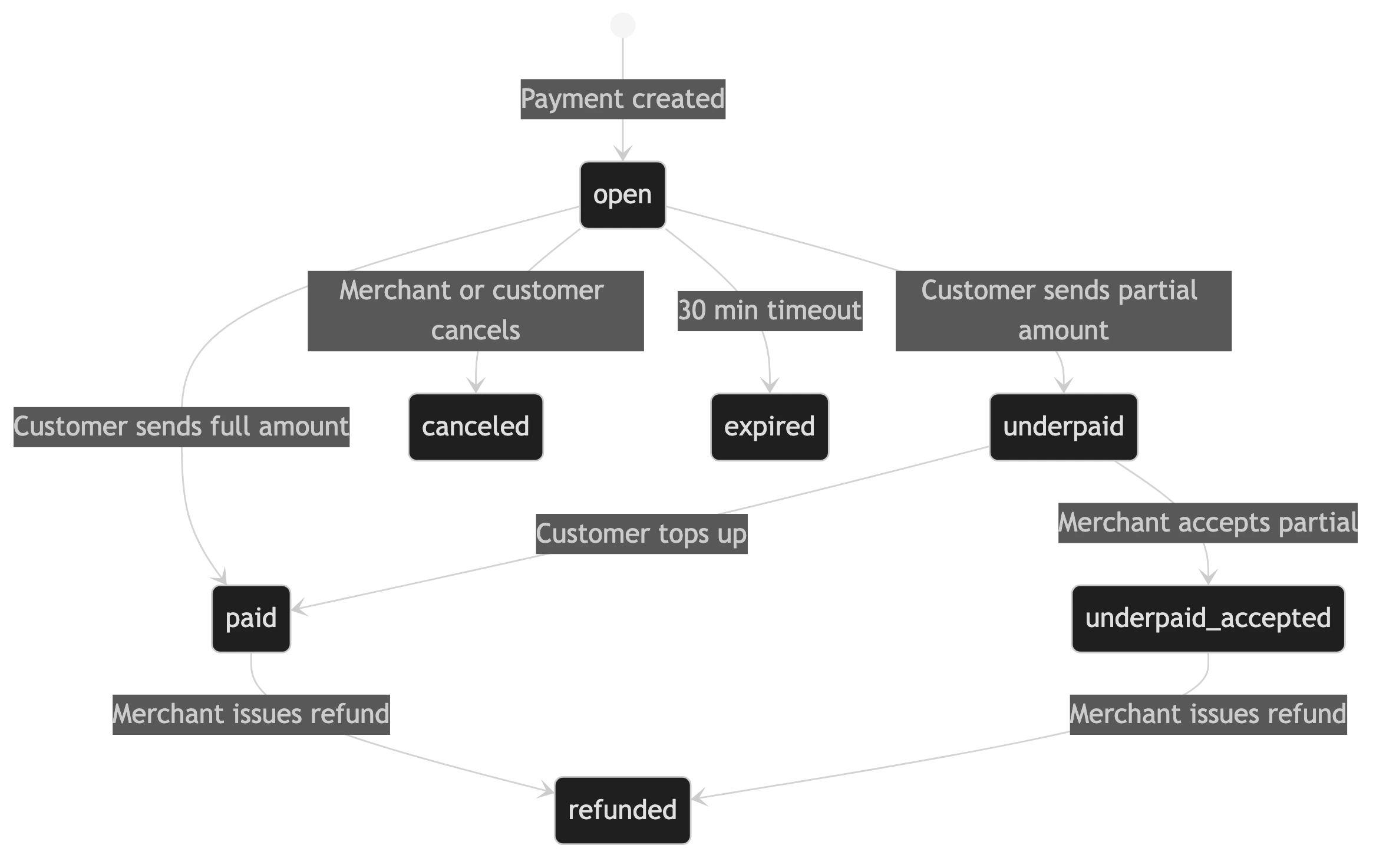 | Status | Description |
| -------------------- | --------------------------------------------------------- |
| `open` | Payment created, waiting for customer |
| `paid` | Full amount received, settlement in progress |
| `underpaid` | Partial amount received, waiting for top-up |
| `underpaid_accepted` | Merchant accepted partial payment, settlement in progress |
| `canceled` | Payment was canceled by the merchant or customer |
| `expired` | Payment timed out (30 minutes) |
| `refunded` | Payment was refunded |
## Settlement
When a payment is marked `paid`, the settlement process begins automatically:
1. Platform fee is deducted
2. Partner commission is calculated (if applicable)
3. Net amount is transferred to the merchant's receive account
4. Webhook is sent with `settlement_status: "paid"`
Settlement is in **USDC** on the Stellar network.
## Amounts
All amounts in the API are in the **smallest unit** of the currency:
* `1000` USD = \$10.00
* `settlement_amount` of `1000` = 10.00 USDC
## Creating a Payment
The `amount.value` is in the smallest unit of the currency. For USD, this means cents.
So `1000` = \$10.00.
```json theme={null}
{
"amount": {
"value": 1000,
"currency": "USD"
},
"description": "Order #1234",
"redirectUrl": "https://yoursite.com/success",
"webhookUrl": "https://yoursite.com/webhook"
}
```
The API returns a `checkout_id` and a `qrCode` (SEP-7 URI) that the customer can scan with any Stellar wallet.
## Idempotency
Network retries and double-submits can otherwise create duplicate payments. To make `POST /payments` safe to retry, send an **`Idempotency-Key`** header — a unique string (max 255 characters) that identifies the logical request:
```bash theme={null}
POST /payments
Idempotency-Key: order-1234
```
* If a request with the same key is replayed after the first one completed, the **original payment's response is returned** — no second payment is created.
* If the original request is still being processed, the retry receives **409**. The 409 is always transient — use a short exponential back-off (e.g. retry after 1s, then 2s).
* Reusing a key with a **different request body** returns **422** (it indicates a client bug).
* A key longer than 255 characters returns **400**.
Use a key that is stable for one logical order — for example your own order id (`order-1234`). The official e-commerce plugins (WooCommerce, PrestaShop, Odoo) do this automatically, keyed by the order.
If you omit the header, each request creates a new payment.
| Status | Description |
| -------------------- | --------------------------------------------------------- |
| `open` | Payment created, waiting for customer |
| `paid` | Full amount received, settlement in progress |
| `underpaid` | Partial amount received, waiting for top-up |
| `underpaid_accepted` | Merchant accepted partial payment, settlement in progress |
| `canceled` | Payment was canceled by the merchant or customer |
| `expired` | Payment timed out (30 minutes) |
| `refunded` | Payment was refunded |
## Settlement
When a payment is marked `paid`, the settlement process begins automatically:
1. Platform fee is deducted
2. Partner commission is calculated (if applicable)
3. Net amount is transferred to the merchant's receive account
4. Webhook is sent with `settlement_status: "paid"`
Settlement is in **USDC** on the Stellar network.
## Amounts
All amounts in the API are in the **smallest unit** of the currency:
* `1000` USD = \$10.00
* `settlement_amount` of `1000` = 10.00 USDC
## Creating a Payment
The `amount.value` is in the smallest unit of the currency. For USD, this means cents.
So `1000` = \$10.00.
```json theme={null}
{
"amount": {
"value": 1000,
"currency": "USD"
},
"description": "Order #1234",
"redirectUrl": "https://yoursite.com/success",
"webhookUrl": "https://yoursite.com/webhook"
}
```
The API returns a `checkout_id` and a `qrCode` (SEP-7 URI) that the customer can scan with any Stellar wallet.
## Idempotency
Network retries and double-submits can otherwise create duplicate payments. To make `POST /payments` safe to retry, send an **`Idempotency-Key`** header — a unique string (max 255 characters) that identifies the logical request:
```bash theme={null}
POST /payments
Idempotency-Key: order-1234
```
* If a request with the same key is replayed after the first one completed, the **original payment's response is returned** — no second payment is created.
* If the original request is still being processed, the retry receives **409**. The 409 is always transient — use a short exponential back-off (e.g. retry after 1s, then 2s).
* Reusing a key with a **different request body** returns **422** (it indicates a client bug).
* A key longer than 255 characters returns **400**.
Use a key that is stable for one logical order — for example your own order id (`order-1234`). The official e-commerce plugins (WooCommerce, PrestaShop, Odoo) do this automatically, keyed by the order.
If you omit the header, each request creates a new payment.